Robots.txt: The Complete Guide
Even though SEO specialists put most of their effort into improving the visibility of pages for their corresponding keywords, in some cases it’s required to hide certain pages from search engines. Let’s find out a bit more about this topic, from the basics through to the advanced syntax and how it applies to AI crawlers too.
Tabla de contenido
¿Qué es un archivo robots.txt?
Robots.txt es un archivo que contiene las áreas de un sitio web donde los robots de los motores de búsqueda tienen prohibido el rastreo. Enumera las URLs que el webmaster no quiere que Google o cualquier motor de búsqueda indexe, impidiendo que visiten y rastreen las páginas seleccionadas. Logramos esto a través de la etiqueta robots.txt disallow que verás en los ejemplos más adelante.
When a bot finds a website on the internet, the first thing it does is check the robots.txt file to learn what it is allowed to explore and what it has to ignore during the crawl.
Ejemplo de Robots.txt
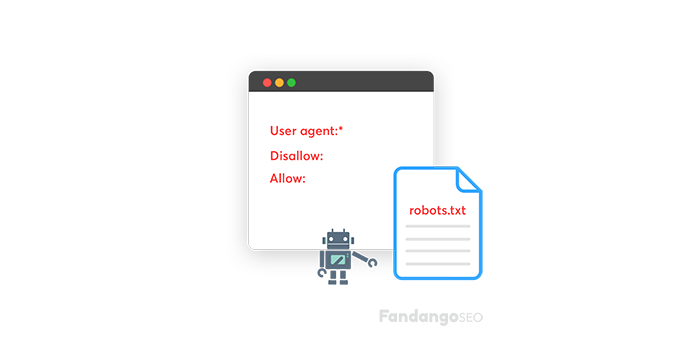
To give you a robots.txt example, this is its syntax:
User-agent: *
# All bots – Old URLs
Allow: /
Disallow: /admin/*
¿Qué es robots.txt en SEO?
Estos tags son necesarios para guiar a los bots de Google cuando encuentran una página nueva. Son necesarios porque:
- They help optimize the crawl budget, as the spider will only visit what’s truly relevant and it’ll make better use of its time crawling a page. An example of a page you wouldn’t want Google to find is a “thank you page”.
- The robots.txt file is a good way to force page indexation by pointing out the pages.
- Los archivos Robots.txt controlan el acceso del crawler a ciertas áreas de tu sitio.
- They can keep entire sections of a website safe, as you can create separate robots.txt files per root domain. A good example is, you guessed it, the payment details page.
- También puedes evitar que las páginas de resultados de búsqueda interna aparezcan en las SERPs.
- Robots.txt puede ocultar archivos que no deberían indexarse, como PDFs o ciertas imágenes.
¿Dónde encuentras el archivo robots.txt?
Robots.txt files are public. You can simply type in a root domain and add /robots.txt to the end of the URL and you’ll see the file, if there is one.
Warning: avoid listing private information in this file.
Puedes encontrar y editar el archivo en el directorio raíz de tu hosting, revisando los archivos admin o el FTP del sitio web.
Cómo editar el archivo robots.txt
Puedes hacerlo tú mismo
- Create or edit the file with a plain text editor.
- Nombra el archivo “robots.txt”, sin ninguna variación como usar letras mayúsculas.
Aquí tienes un ejemplo de cuando quieres que se rastree el sitio. Presta atención a cómo usamos el tag robots.txt disallow.
User-agent: *
Disallow:
Observa que dejamos “Disallow” vacío, lo que indica que no hay nada que no se permita rastrear.
En caso de que quieras bloquear una página, añade esto (usando el ejemplo de la “Página de agradecimiento”):
User-agent: *
Disallow: /thank-you/
- Usa un archivo robots.txt separado para cada subdominio.
- Coloca el archivo en el directorio de nivel superior del sitio web.
- You can test the robots.txt file using Google Search Console before uploading it to your root directory. The URL Inspection tool will tell you whether a given URL is blocked.
- Take note that FandangoSEO is the ultimate robots.txt checker. Use it to monitor them.
See, it isn’t so difficult to configure your robots.txt file and edit it anytime. Just keep in mind that all you want from this action is to make the most of the bots’ visits. By blocking them from seeing irrelevant pages, you’ll ensure their time spent on the website will be much more profitable.
Finally, remember that the SEO best practice for robots.txt is to ensure that all the relevant content is indexable and ready to be crawled. You can see the percentage of indexable and non-indexable pages among the total pages of a site using FandangoSEO’s crawl, as well as the pages blocked by the robots.txt file.
Advanced robots.txt syntax
The examples above cover the basics, but robots.txt supports a few more directives and pattern-matching rules worth knowing once you’re managing a larger or more complex site.
Wildcards and the end-of-string anchor
Google’s robots.txt parser supports two special characters: *, which matches any sequence of characters, and $, which marks the end of a URL. These let you write rules that cover a pattern instead of a single exact path.
User-agent: *
Disallow: /*.pdf$
Disallow: /*?sort=
The first line blocks every URL ending in .pdf, wherever it sits on the site. The second blocks any URL containing a ?sort= parameter, which is a common way to keep faceted or sorted filter pages out of the index without listing every single one.
Allow and Disallow precedence
When an Allow rule and a Disallow rule could both apply to the same URL, the more specific rule wins, regardless of which one appears first in the file.
User-agent: *
Disallow: /downloads/
Allow: /downloads/catalog.pdf
Here, everything in /downloads/ is blocked, except for that one specific file, since the Allow rule is more specific than the broader Disallow above it.
The Sitemap directive
You can point crawlers directly to your sitemap from inside robots.txt, which helps any crawler discover it without needing a separate submission:
Sitemap: https://www.example.com/sitemap.xml
This line can sit anywhere in the file and works independently of any User-agent group.
The Crawl-delay directive
Crawl-delay tells a bot how many seconds to wait between requests, intended to avoid overloading your server:
User-agent: *
Crawl-delay: 10
Worth knowing before you rely on it: Googlebot ignores Crawl-delay entirely. If you need to control how fast Google crawls your site, that’s managed through the crawl rate settings in Google Search Console instead. Bing and Yandex do honor the directive, so it’s still useful if server load from those crawlers is a concern.
Robots.txt and AI crawlers
Robots.txt isn’t just for traditional search engines anymore. Tools like ChatGPT, Claude, and Perplexity run their own crawlers, and you can control their access the same way you would Googlebot, by name.
User-agent: GPTBot
Disallow: /
User-agent: ClaudeBot
Allow: /
User-agent: PerplexityBot
Allow: /
A few things worth knowing about the major ones:
- GPTBot is OpenAI’s crawler, used to gather content that informs ChatGPT.
- ClaudeBot is Anthropic’s crawler, used for content that informs Claude.
- PerplexityBot is Perplexity’s crawler, used for its live, cited answers.
- Google-Extended is separate from regular Googlebot. It controls whether your content can be used to train Google’s AI models. Blocking it does not affect your regular Google Search rankings, the two are independent systems.
As with any crawler, robots.txt is a request rather than an enforced block, well-behaved crawlers respect it, but the file itself has no technical way to force compliance. For the fuller picture on optimizing your site for AI crawlers specifically, including rendering and structured data, see our guide on Technical SEO for AI Search Engines.
Mejores prácticas SEO para Robots.txt
Follow these tips to manage the robots.txt file properly:
No bloquees contenido que quieras que se rastree
Tampoco deberías bloquear secciones del sitio web que deberían ser rastreadas.
Ten en cuenta que los bots no seguirán los enlaces de las páginas bloqueadas por robots.txt
A menos que también estén enlazados desde otras páginas a las que los motores de búsqueda puedan acceder porque no han sido bloqueadas, los recursos enlazados no se rastrearán y podrían no indexarse.
Además, ningún valor de enlace puede pasar de la página bloqueada al destino del enlace. Si tienes páginas a las que quieres dar autoridad, debes utilizar un mecanismo de bloqueo distinto al robots.txt.
No uses robots.txt para evitar mostrar datos confidenciales en la página de resultados del motor de búsqueda
Otras páginas pueden enlazar directamente a la página que contiene información confidencial (evitando así las directrices de robots.txt en tu dominio raíz o página de inicio), por lo que aún puede indexarse.
Deberías utilizar un método diferente, como la protección con contraseña o la metaetiqueta noindex, para evitar que la página aparezca en los resultados de búsqueda de Google.
Remember that blocking a page in robots.txt doesn’t remove it from the index
This trips people up more often than you’d expect. If a page is already indexed and you block it with Disallow, Google stops crawling it, but that alone doesn’t remove it from search results, since Google may still show the URL based on links pointing to it. And if you add a noindex tag to that same page hoping it’ll be removed, it won’t work either, because a blocked page can’t be crawled, which means Google can never actually see the noindex tag. To remove a page from the index properly, use noindex first and let it be crawled, then block it afterward if you still want to.
Recuerda que algunos motores de búsqueda tienen múltiples user agents
Google, por ejemplo, utiliza GoogleBot para la búsqueda orgánica y GoogleBot-Image para la búsqueda de imágenes.
La mayoría de los user agents del mismo motor de búsqueda siguen las mismas reglas, por lo que no tienes que especificar directrices para cada crawler de motor de búsqueda, pero hacerlo te permite controlar cómo se rastreará el contenido del sitio.
El motor de búsqueda guarda en caché el contenido del archivo robots.txt, pero normalmente actualiza los datos almacenados en caché diariamente
Si cambias el archivo y quieres actualizarlo más rápido, puedes enviar la URL del robots.txt a Google.
Don’t accidentally block your CSS or JavaScript files
This one is easy to miss, especially on older sites with broad Disallow rules for folders like /assets/ or /static/. If Google, or any AI crawler that renders pages, can’t fetch the CSS and JavaScript a page needs, it can’t see the page the way a real visitor does, which can affect both how it’s indexed and how well it’s understood. Always double check that your Disallow rules aren’t sweeping up resource files along with the pages you actually meant to block.
Limitaciones del archivo Robots.txt
Por último, vamos a ver qué aspectos limitan la función del archivo robots.txt:
Las páginas seguirán apareciendo en los resultados de búsqueda
Aquellas páginas que son inaccesibles para los motores de búsqueda debido al archivo robots.txt pero que tienen enlaces a ellas pueden seguir apareciendo en los resultados de búsqueda desde una página rastreable.
Solo contiene directivas
Google respeta mucho el archivo robots.txt, pero sigue siendo una directiva y no una obligación.
Tamaño del archivo
Google supports a limit of 500 KiB (roughly 512,000 bytes) for robots.txt files, and if the content exceeds this maximum size, it can ignore anything past that point. We don’t know if other search engines set the same limit for their own crawlers.
Robots.txt is cached for up to 24 hours
Según Google, el archivo robots.txt suele guardarse en caché hasta 24 horas. Algo a tener en cuenta al realizar cambios en el archivo.
No está del todo claro cómo gestionan otros motores de búsqueda el archivo almacenado en caché, pero es mejor evitar el almacenamiento en caché de tu robots.txt para que los motores de búsqueda no tarden más en detectar los cambios.

5xx Server Errors Meta Robots Tag